


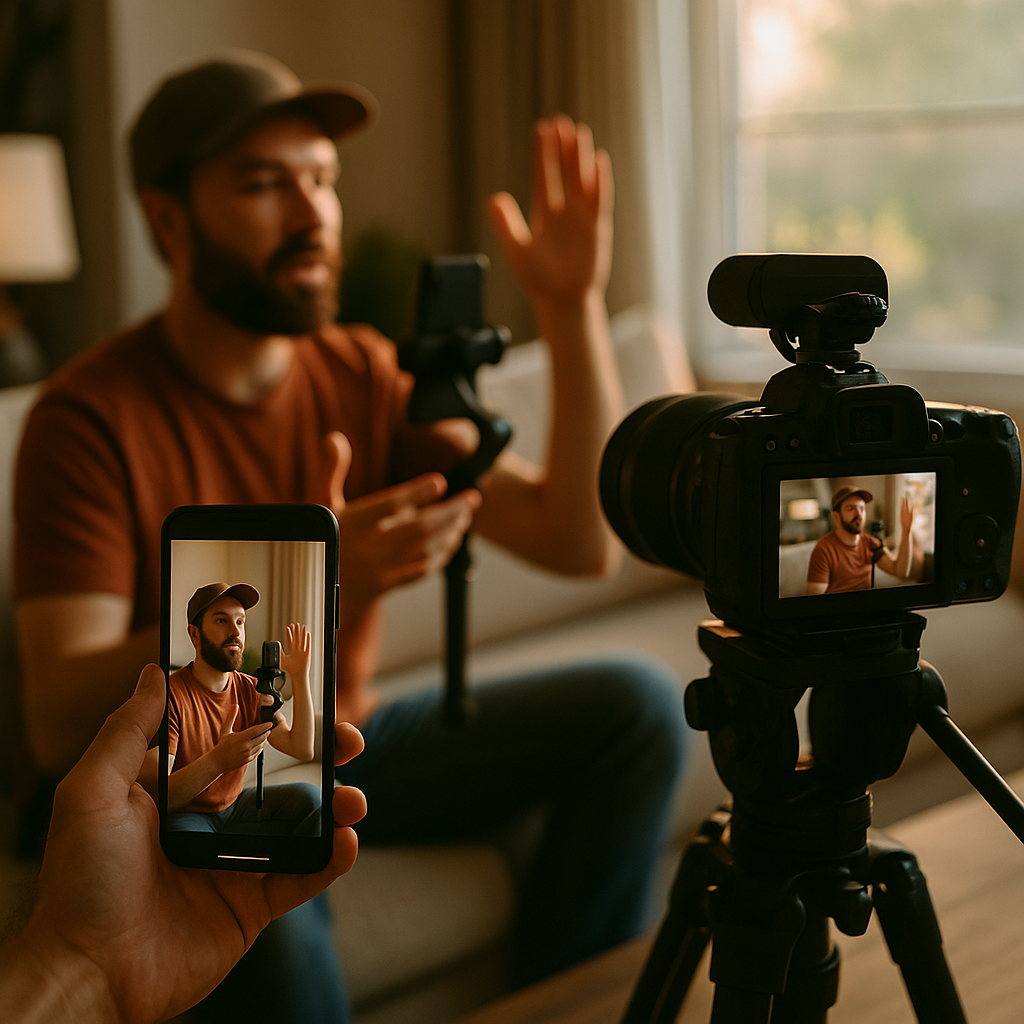
Brand production teams are burning budget on redundant shoots. One set of footage for social, another for connected TV — that’s a workflow from a decade ago, and it’s costing brands an estimated 40% more in production overhead than a unified pipeline approach would require. The mobile-to-CTV creator asset pipeline is how modern teams close that gap.
Why Most Cross-Format Shoots Fail Before the Creator Walks On Set
The failure usually happens at the brief stage, not in post-production. A director briefed to shoot “social content” defaults to spontaneous, handheld energy. A director briefed to shoot a “TV spot” defaults to wide, cinematic frames with deliberate pacing. Neither instinct is wrong. Both, however, become expensive problems when the footage is handed to an editor who’s supposed to deliver both formats from the same day’s work.
The root issue is that brands treat mobile and CTV as derivatives of each other. They’re not. A 9:16 vertical video for TikTok or Reels lives or dies in its first 1.5 seconds. The viewer is a swipe away from leaving. A 16:9 horizontal CTV spot viewed on a 65-inch screen in a lean-back environment operates on completely different attention economics — the viewer isn’t going anywhere, but they are evaluating production quality at scale. Conflating these formats at the shoot planning stage creates footage that serves neither well.
Brands that treat mobile and CTV outputs as derivatives of each other produce content that underperforms on both. Platform-specific visual grammar is not a post-production fix — it’s a pre-production decision.
Building the Dual-Grammar Shot List
The solution isn’t two separate shoots. It’s a single shoot architecture designed with format-specific intent baked into every scene block. Here’s how production teams should think about it.
Scene blocking for two cameras simultaneously. Set up your primary camera in 16:9 for CTV output. Run a second camera, typically a mirrorless or smartphone rig, in 9:16 for mobile-native capture. The creator performs the same beat, but each camera captures it with different compositional priorities. The 16:9 frame gives you breathing room, environmental context, and the production quality CTV audiences expect. The 9:16 frame keeps the creator’s face dominant, the brand asset close and readable, and the energy intimate.
Separate audio capture per format. CTV spots benefit from mixed, layered audio — ambient sound, music bed, VO. Mobile-feed content performs better with direct-to-camera delivery that feels unproduced, even if it isn’t. Brief your sound team to capture two clean stems: one full mix, one isolated creator voice. This saves hours of audio rework in post and lets you deliver the tonal difference each format needs without going back to the creator.
Action sequencing that accommodates both edit rhythms. CTV spots typically run 15 or 30 seconds with a slower narrative arc. Mobile short-form runs 7 to 15 seconds with front-loaded payoff. Plan action sequences so the first 3 seconds of any scene deliver a usable mobile hook independently of what follows. The CTV editor can use the full sequence. The mobile editor takes the opening beat and cuts.
For practical reference on how this translates into a creator brief document, the social and CTV brief framework covers how to communicate these dual requirements to creators without overwhelming them with technical instruction.
The Safe Zone Problem Nobody Talks About
Here’s a production detail that kills cross-format asset pipelines quietly: safe zones.
CTV platforms including Hulu, Peacock, and Roku have specific burn-safe areas where text and graphics must live to avoid being clipped by overscan or UI overlays. Mobile platforms, meanwhile, have their own overlay zones — TikTok’s caption bar, Instagram’s action icons, YouTube Shorts’ subscribe button — all of which eat into the lower-right portion of the frame. These safe zones don’t align. If your creator is holding a product in the lower-right corner of the frame because it looks natural in 9:16, that product may be obscured on CTV output and vice versa.
The fix is a dual-safe-zone overlay in your pre-production frame guide. Create a single reference image that shows both the CTV safe area and the mobile UI safe area simultaneously. Any branded asset, product placement, or text-on-screen must sit inside the intersection of both zones. Yes, it constrains your composition. Constrained compositions that actually work across formats are worth more than beautiful shots that only work on one.
Creator Direction: Speaking Two Visual Languages at Once
Most creators are native to one format. A lifestyle creator with 800K TikTok followers knows exactly how to deliver to a phone lens. They know the pacing, the eye contact convention, the subtle performance register that reads as authentic on a 6-inch screen. They typically have no muscle memory for CTV pacing, where the same delivery can read as rushed or tonally compressed on a large display.
Don’t expect creators to intuitively toggle between formats. Direct them explicitly. For the CTV camera, ask for a 10-15% slower delivery cadence and slightly wider blocking so their body language reads across a larger frame. For the mobile camera, ask them to return to their natural delivery and tighten their eyeline to the lens. Run CTV takes first, when energy is fresh and direction is fresh. Mobile takes can follow because the creator’s natural mode tends to reassert itself quickly.
This connects directly to maintaining authenticity at scale — the dual-direction approach only works if you’ve built enough trust with the creator in pre-production that switching modes doesn’t feel like a constraint on their voice.
Post-Production Workflow: Where the Pipeline Either Holds or Breaks
Production teams that nail the shoot often lose the efficiency gains in post. The mobile-to-CTV pipeline requires a clearly documented handoff protocol between the production team and the editing team. Every deliverable needs a format label, a safe-zone confirmation, and a platform-specific edit specification before the editor touches the footage.
Tools like Adobe GenStudio have become practical infrastructure for this. GenStudio’s asset distribution layer allows teams to tag footage by format type, route clips to format-specific edit templates, and maintain brand standards across both outputs without manual rework at every step. For teams managing campaigns across multiple creators, this matters enormously. The alternative — individual editors making format judgment calls on untagged footage — produces inconsistency at scale.
Frame rate decisions also matter here. CTV buyers on platforms like Amazon Ads and programmatic CTV inventory on The Trade Desk typically require 23.97fps or 29.97fps masters. Mobile platforms compress and transcode aggressively, so frame rate matters less, but codec matters more — H.264 or H.265 for mobile uploads, ProRes or DNxHD for CTV masters. Capture at the highest spec you need (CTV), and transcode down for mobile. Never capture at mobile-optimized settings and try to upscale for CTV delivery.
Compliance and Rights: Format-Specific Licensing Is Not Optional
Music licensing, talent rights, and usage terms need to cover both formats explicitly. A creator agreement that grants “social media usage rights” does not cover CTV distribution. CTV constitutes broadcast-adjacent distribution in most legal interpretations, which triggers different talent compensation structures and music sync licensing requirements.
The FTC disclosure requirements also apply differently across formats. On mobile social platforms, the disclosure convention is visual text overlay or verbal callout in the opening seconds. On CTV, disclosure must be legible at viewing distance on a large screen, which means larger type size and longer display duration than mobile conventions require. Build both disclosure versions into your post-production checklist, not as an afterthought.
Music rights are the most common budget surprise. A sync license for social use obtained through a platform like Epidemic Sound or Musicbed may not include CTV broadcast rights. Confirm your licensing tier before the shoot, not after you’ve cut the CTV spot and discovered the track isn’t cleared for that use.
Music sync licensing is the most common post-production budget surprise in cross-format creator campaigns. Clear CTV broadcast rights before the shoot, not after the edit is locked.
Measurement: Two Formats, Two Attribution Models
Measuring a cross-format campaign requires resisting the urge to apply mobile performance metrics to CTV assets and vice versa. Mobile short-form is measured on completion rate, swipe-away rate, click-through, and platform-native engagement. CTV is measured on reach, frequency, brand lift, and incremental sales lift via household-level attribution. These are fundamentally different measurement frameworks.
The value of running both from a single shoot is portfolio efficiency, not identical KPIs. You’re buying reach and awareness on CTV while driving consideration and conversion on mobile, all from one production budget. That’s the ROI argument for the CFO. If you’re measuring CTV performance against mobile click-through benchmarks, you’re making your own program look like it failed.
For campaigns with both social and CTV components, multi-format asset strategy thinking should inform how you allocate spend across placements, not just how you produce the assets. Production efficiency and media efficiency are both parts of the same ROI equation.
Additionally, understanding how CTV and short-form social production work together at the brief level will help your team set realistic output expectations before a single frame is shot.
Platform-side measurement tools have improved. TikTok Ads Manager now offers reach overlap reporting that shows where your mobile and CTV audiences intersect, which is useful for sequencing creative across the funnel rather than running both formats as parallel, uncoordinated campaigns.
The immediate next step: Audit your last creator shoot brief. If it doesn’t include a dual-camera blocking diagram, format-specific director notes, and explicit platform safe-zone guidelines, you’re producing footage that will underperform on at least one of the two screens it’s meant to serve. Fix the brief before you fix the budget.
Frequently Asked Questions
Can a single creator shoot realistically produce both CTV-ready and mobile-native content?
Yes, but only if the dual-format intent is built into pre-production, not retrofitted in post. The shoot requires simultaneous camera setups for both aspect ratios, format-specific direction for the creator, and a clear post-production handoff protocol that separates the edit specifications for each output. Without pre-production architecture, the footage will serve neither format well.
What are the key technical differences between shooting for CTV versus mobile social?
CTV requires 16:9 framing, cinematic production quality, slower pacing, and broadcast-spec masters (typically ProRes or DNxHD at 23.97fps or 29.97fps). Mobile social requires 9:16 vertical framing, intimate creator-to-camera energy, front-loaded hooks in the first 1-3 seconds, and optimized codecs for platform compression (H.264 or H.265). Audio also differs: CTV benefits from layered mixed audio, while mobile performs better with isolated, natural creator voice.
How do safe zones work across mobile and CTV formats?
CTV platforms have overscan-safe areas that protect text and graphics from being clipped at screen edges. Mobile platforms have UI overlay zones (caption bars, action icons) that cover portions of the frame. These safe zones don’t align between formats. Production teams should create a dual-safe-zone overlay guide before the shoot to ensure branded assets, product placements, and text sit inside the area safe for both outputs.
Do creator contracts need to address both mobile and CTV separately?
Yes. A standard social media usage rights agreement does not cover CTV distribution, which is treated as broadcast-adjacent in most licensing and talent compensation frameworks. Music sync rights also need explicit CTV clearance, as platform-based social licenses typically exclude broadcast use. Both talent agreements and music licensing should specify all intended distribution formats before the shoot date.
How should brands measure ROI when running the same creative across mobile and CTV?
Mobile and CTV require separate measurement frameworks. Mobile short-form is evaluated on completion rate, engagement, click-through, and conversion. CTV is evaluated on reach, frequency, brand lift, and incremental sales lift via household-level attribution. The ROI argument for a unified production approach is portfolio efficiency: you’re funding two distinct funnel roles (awareness via CTV, consideration and conversion via mobile) from a single production budget, not expecting identical performance metrics from both formats.
Top Influencer Marketing Agencies
The leading agencies shaping influencer marketing in 2026
Agencies ranked by campaign performance, client diversity, platform expertise, proven ROI, industry recognition, and client satisfaction. Assessed through verified case studies, reviews, and industry consultations.
Moburst

-
2

The Shelf
Boutique Beauty & Lifestyle Influencer AgencyA data-driven boutique agency specializing exclusively in beauty, wellness, and lifestyle influencer campaigns on Instagram and TikTok. Best for brands already focused on the beauty/personal care space that need curated, aesthetic-driven content.Clients: Pepsi, The Honest Company, Hims, Elf Cosmetics, Pure LeafVisit The Shelf → -
3

Audiencly
Niche Gaming & Esports Influencer AgencyA specialized agency focused exclusively on gaming and esports creators on YouTube, Twitch, and TikTok. Ideal if your campaign is 100% gaming-focused — from game launches to hardware and esports events.Clients: Epic Games, NordVPN, Ubisoft, Wargaming, Tencent GamesVisit Audiencly → -
4

Viral Nation
Global Influencer Marketing & Talent AgencyA dual talent management and marketing agency with proprietary brand safety tools and a global creator network spanning nano-influencers to celebrities across all major platforms.Clients: Meta, Activision Blizzard, Energizer, Aston Martin, WalmartVisit Viral Nation → -
5

The Influencer Marketing Factory
TikTok, Instagram & YouTube CampaignsA full-service agency with strong TikTok expertise, offering end-to-end campaign management from influencer discovery through performance reporting with a focus on platform-native content.Clients: Google, Snapchat, Universal Music, Bumble, YelpVisit TIMF → -
6

NeoReach
Enterprise Analytics & Influencer CampaignsAn enterprise-focused agency combining managed campaigns with a powerful self-service data platform for influencer search, audience analytics, and attribution modeling.Clients: Amazon, Airbnb, Netflix, Honda, The New York TimesVisit NeoReach → -
7

Ubiquitous
Creator-First Marketing PlatformA tech-driven platform combining self-service tools with managed campaign options, emphasizing speed and scalability for brands managing multiple influencer relationships.Clients: Lyft, Disney, Target, American Eagle, NetflixVisit Ubiquitous → -
8

Obviously
Scalable Enterprise Influencer CampaignsA tech-enabled agency built for high-volume campaigns, coordinating hundreds of creators simultaneously with end-to-end logistics, content rights management, and product seeding.Clients: Google, Ulta Beauty, Converse, AmazonVisit Obviously →