


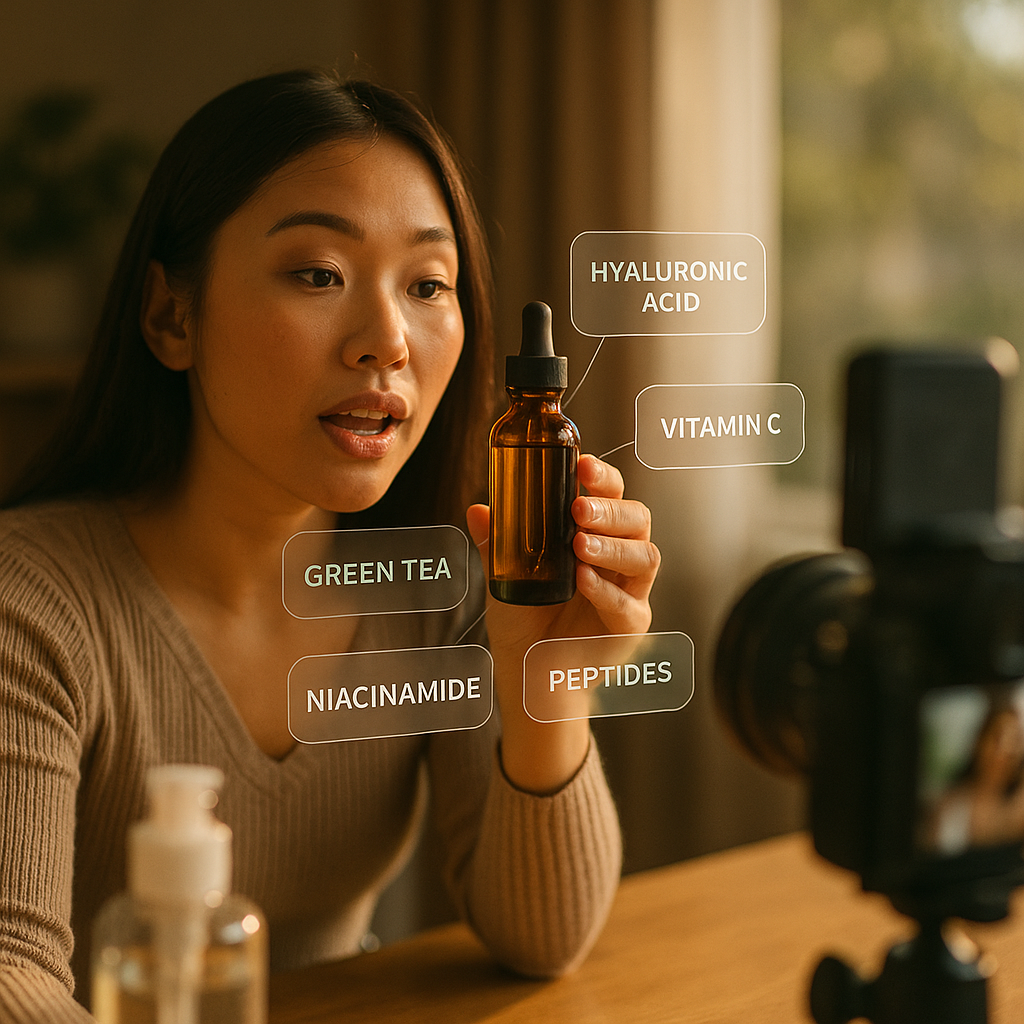
Sixty-eight percent of shoppers say they’ve abandoned a livestream purchase after failing to find basic ingredient or nutrition info mid-broadcast. That’s not a UX footnote — it’s a revenue leak. The ingredient callout overlay format fixes it by putting nutrition data directly on screen while a host demos the product, and it’s quickly becoming table stakes for livestream commerce in supplements, food, and beauty categories.
If your brand runs livestream shopping on TikTok Shop, Whatnot, or Amazon Live, this isn’t a nice-to-have anymore. It’s a conversion lever and a compliance shield at the same time. Here’s how to brief it properly.
Why This Format Exists Now
Livestream commerce grew up fast. Hosts learned to hold attention, drop urgency cues, and close sales in real time. What lagged behind was substantiation. Regulators noticed. The FTC’s endorsement guidance has increasingly scrutinized health and wellness claims made in unscripted, live formats where there’s no caption space or static label to fall back on.
Ingredient callout overlays solve two problems at once: they give viewers the label-level transparency they’d get in a store, and they give brands a defensible paper trail showing claims were substantiated on screen, not just spoken aloud and forgotten.
There’s also a plain commercial reason. Shoppers scrutinizing supplements, snacks, or skincare want proof before they tap “buy.” A host saying “this has electrolytes” means less than a graphic showing 300mg of sodium and 990mg of potassium per serving, timed to the exact moment the host holds up the product.
Overlay-supported livestreams in the food and supplement categories have shown measurably lower return and dispute rates than streams relying on verbal claims alone — transparency reduces buyer’s remorse before it happens.
What the Format Actually Looks Like
Picture a split-attention screen. The host is mid-demo — mixing a protein powder, applying a serum, tasting a snack. As they speak to a specific benefit, a lower-third or side-panel graphic populates with the relevant nutrition fact: calories, macros, allergens, active ingredient percentage, or sourcing claim.
The overlay isn’t static. It should shift with the conversation. When the host moves from “high protein” to “no added sugar,” the callout swaps too. Think of it as subtitles for substantiation.
- Trigger points: Overlays appear when a specific claim is spoken, not on a fixed timer.
- Data hierarchy: Lead with the number (25g protein), not the adjective (“high protein”).
- Visual weight: Overlay should occupy no more than 15-20% of screen real estate to avoid obscuring the product.
- Persistence: Critical allergen or safety info stays visible longer than marketing claims.
This is a production choreography problem as much as a design one. Hosts need a cue system — a producer tapping a table, a floor graphic, a earpiece prompt — so the overlay timing doesn’t feel like an afterthought bolted onto the stream.
Briefing the Host: What Changes
Most livestream sellers are trained to riff. That’s their value — spontaneity sells. But spontaneity and regulatory-grade claims don’t mix well without guardrails. Your brief needs to give hosts a claims library, not a script.
Build a reference sheet of pre-approved, data-backed statements the host can pull from naturally. “Zero grams added sugar, verified” reads differently than “no sugar at all,” and only one of those survives a compliance review.
Pair this with a rehearsal pass focused purely on timing the verbal claim to the overlay trigger. Hosts who nail this make the format feel additive, not clunky. Hosts who don’t end up talking over their own graphics, which confuses viewers and undercuts the very transparency you’re trying to build.
This pairs well with guidance we’ve covered on casual-over-polished content briefs — the overlay format works best when it still feels live and unscripted, even though the data behind it is locked down.
Design Specs Brands Actually Need to Set
Don’t leave overlay design to whoever’s running OBS that day. Specify it the way you’d spec a product label, because functionally, that’s what it is now.
- Font size minimums: Nutrition data must be legible on a 6-inch phone screen, which usually means no smaller than 24px equivalent at 1080p.
- Contrast ratio: Meet at least 4.5:1 against the video background, since livestream lighting is inconsistent and viewers watch on variable brightness settings.
- Duration: Minimum 3-second hold per data point, longer for allergen warnings.
- Source citation: Small-print reference to lab testing or FDA panel data builds credibility without cluttering the main graphic.
- Platform template compatibility: TikTok Shop, Whatnot, and Amazon Live each have different overlay real estate available before native UI (cart button, chat feed) intrudes. Design three variants, not one.
Skipping the platform-specific variant step is the single most common mistake we see. A callout designed for Amazon Live’s wider frame gets clipped or overlapped by chat on TikTok Shop, and suddenly your allergen warning is hidden behind a comment bubble. Test on-device before launch, every time.
Where the Data Comes From — and Who Signs Off
This is the part legal teams care about most. Every number on screen needs a traceable source: a Certificate of Analysis, an FDA nutrition panel, or third-party lab testing. Build a simple approval chain before the first stream airs.
- Compliance/legal approves the master claims and data sheet.
- Creative builds overlay templates against that approved sheet.
- Host receives a “claims-only” cheat sheet, not the raw lab data.
- Producer verifies overlay-to-claim timing in a dry run.
- Post-stream, a clipped VOD is archived with overlays intact for audit purposes.
That last step matters more than brands realize. Livestreams often disappear from platform feeds after a set window, but if a regulator or a customer disputes a claim months later, you need the archived footage showing the overlay was present and accurate at time of sale. This is basic risk mitigation, the same logic that underpins FTC-compliant creator series briefs for recorded content.
Measuring Whether It’s Working
Don’t just ship the format and hope. Track it against a control window of non-overlay streams if you can, or at minimum benchmark before and after rollout.
- Conversion rate during ingredient-claim segments versus general demo segments.
- Watch-time retention in the 5-10 seconds after an overlay appears — does it hold attention or trigger drop-off?
- Post-purchase return rate, specifically returns citing “not as described” or allergy concerns.
- Comment sentiment around trust language (“finally shows the actual numbers,” “wish more streams did this”).
Brands running food and supplement livestreams on TikTok Shop have reported that overlay-supported segments hold viewers longer than pure talk-and-hold demos, likely because the graphic gives passive scrollers a reason to pause and read. Attention is currency in live formats; a well-timed data callout is one of the few production choices that increases both trust and dwell time simultaneously.
If you’re also running paid amplification of stream clips afterward, treat the overlay as a creative asset in its own right. It often outperforms plain product shots in retargeting, a pattern similar to what we’ve seen in price-per-use breakdown formats — specificity sells better than adjectives, whether the number is a price or a milligram count.
Common Pitfalls That Kill the Format
A few ways brands get this wrong, repeatedly:
- Overloading the screen. Five data points at once reads as noise, not proof. Sequence them.
- Mismatched timing. If the host says “low sugar” three seconds before the graphic appears, viewers lose the connection entirely.
- Static templates across every SKU. A protein bar and a serum need different data hierarchies. Don’t force one template to serve both.
- No fallback for chat overlap. On high-traffic streams, native chat can bury your callout. Design a “safe zone” that assumes chat is present.
- Treating it as a one-time compliance box to check. Overlay content needs the same refresh cadence as your product labels — new formulation, new overlay, immediately.
Most of these are fixable in a single production meeting if the brief is specific enough up front. The format rewards precision. Vague direction like “add some nutrition info on screen” produces exactly the cluttered, mistimed graphics that erode trust instead of building it.
Frequently Asked Questions
FAQs
What is an ingredient callout overlay in livestream selling?
It’s an on-screen graphic that displays nutrition, ingredient, or sourcing data in real time during a livestream product demo, timed to match whatever claim the host is making at that moment.
Why are brands adding this format now instead of relying on hosts to speak claims aloud?
Verbal-only claims are harder to substantiate after the fact and carry more regulatory risk. Overlays create a visible, archivable record and tend to build more shopper trust than spoken statements alone.
Which platforms support ingredient callout overlays best?
TikTok Shop, Whatnot, and Amazon Live all support custom overlay graphics, but each has different screen real estate and native UI elements like chat and cart buttons that can obscure a poorly placed callout, so templates need platform-specific adjustment.
Who should approve the data shown in the overlay?
Legal or compliance should sign off on the underlying data sheet before creative builds any template, and hosts should work from a simplified claims cheat sheet rather than raw lab data.
Does this format actually improve conversion, or is it just a compliance measure?
Both. Brands tracking overlay-supported segments have reported stronger watch-time retention and lower post-purchase disputes, suggesting the transparency helps close sales as much as it protects against regulatory risk.
How long should a callout stay on screen?
A minimum of three seconds for general nutrition claims, longer for allergen or safety warnings, since those need to register even with a distracted or scrolling viewer.
Start with one SKU, one platform, and a tight claims sheet before scaling the format across your whole livestream calendar. Get the timing and data hierarchy right on a single stream, then template it out — trying to launch overlays across every channel at once is how brands end up with cluttered, mistimed graphics instead of the trust boost they were after.
Top Influencer Marketing Agencies
The leading agencies shaping influencer marketing in 2026
Agencies ranked by campaign performance, client diversity, platform expertise, proven ROI, industry recognition, and client satisfaction. Assessed through verified case studies, reviews, and industry consultations.
Moburst

-
2

The Shelf
Boutique Beauty & Lifestyle Influencer AgencyA data-driven boutique agency specializing exclusively in beauty, wellness, and lifestyle influencer campaigns on Instagram and TikTok. Best for brands already focused on the beauty/personal care space that need curated, aesthetic-driven content.Clients: Pepsi, The Honest Company, Hims, Elf Cosmetics, Pure LeafVisit The Shelf → -
3

Audiencly
Niche Gaming & Esports Influencer AgencyA specialized agency focused exclusively on gaming and esports creators on YouTube, Twitch, and TikTok. Ideal if your campaign is 100% gaming-focused — from game launches to hardware and esports events.Clients: Epic Games, NordVPN, Ubisoft, Wargaming, Tencent GamesVisit Audiencly → -
4

Viral Nation
Global Influencer Marketing & Talent AgencyA dual talent management and marketing agency with proprietary brand safety tools and a global creator network spanning nano-influencers to celebrities across all major platforms.Clients: Meta, Activision Blizzard, Energizer, Aston Martin, WalmartVisit Viral Nation → -
5

The Influencer Marketing Factory
TikTok, Instagram & YouTube CampaignsA full-service agency with strong TikTok expertise, offering end-to-end campaign management from influencer discovery through performance reporting with a focus on platform-native content.Clients: Google, Snapchat, Universal Music, Bumble, YelpVisit TIMF → -
6

NeoReach
Enterprise Analytics & Influencer CampaignsAn enterprise-focused agency combining managed campaigns with a powerful self-service data platform for influencer search, audience analytics, and attribution modeling.Clients: Amazon, Airbnb, Netflix, Honda, The New York TimesVisit NeoReach → -
7

Ubiquitous
Creator-First Marketing PlatformA tech-driven platform combining self-service tools with managed campaign options, emphasizing speed and scalability for brands managing multiple influencer relationships.Clients: Lyft, Disney, Target, American Eagle, NetflixVisit Ubiquitous → -
8

Obviously
Scalable Enterprise Influencer CampaignsA tech-enabled agency built for high-volume campaigns, coordinating hundreds of creators simultaneously with end-to-end logistics, content rights management, and product seeding.Clients: Google, Ulta Beauty, Converse, AmazonVisit Obviously →