


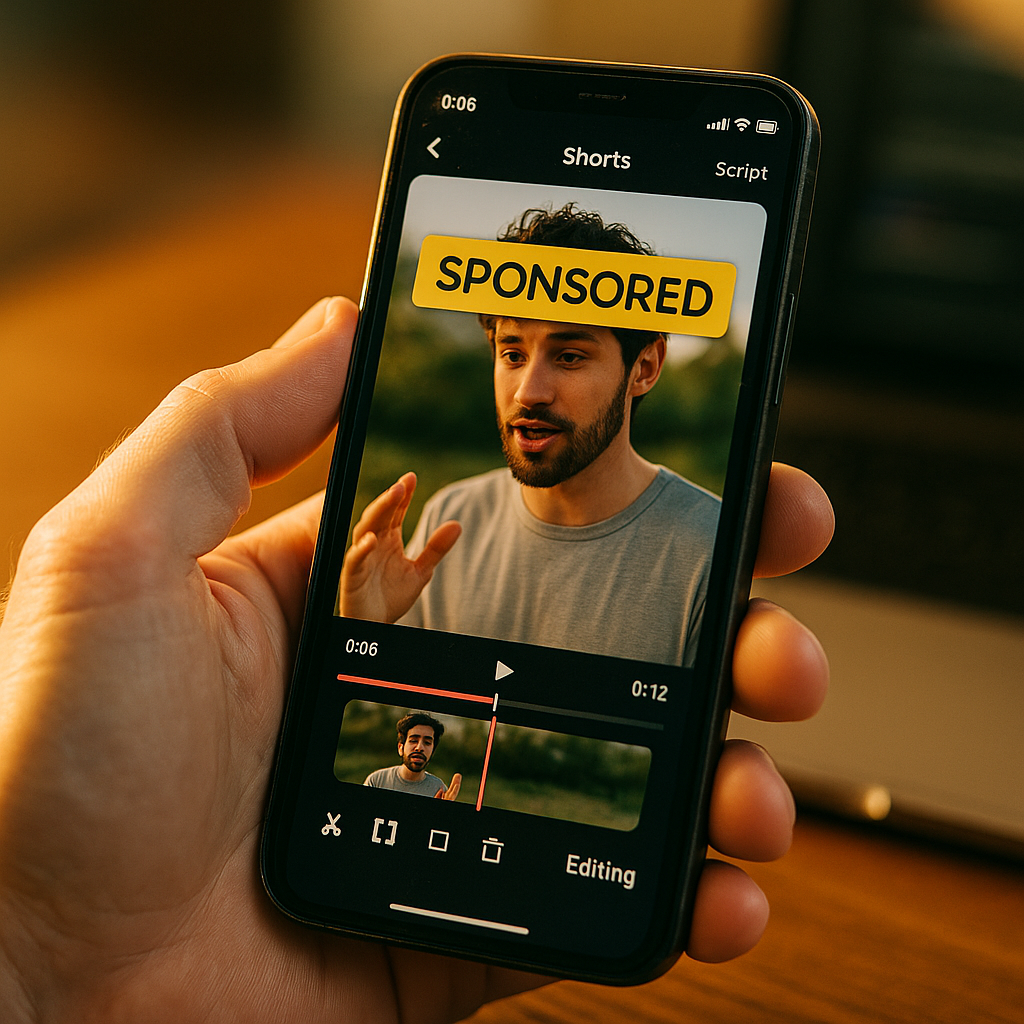
Twenty three pixels. That’s roughly how much vertical real estate YouTube’s mandatory sponsored overlay now eats out of every paid Short, sitting right where most creators used to plant their hook text. If your scripts still assume a clean frame, you’re already losing viewers in the first second. The YouTube Shorts mandatory sponsored overlay isn’t a cosmetic tweak. It’s a structural change to how disclosure, branding, and attention compete for the same four inches of screen.
What Actually Changed
YouTube quietly expanded its automatic “Paid Promotion” label on Shorts from a small tag to a persistent overlay that sits on screen longer and takes up more visual weight than the old disclosure badge. Creators no longer get to bury it in a description or a verbal mention three seconds in. The platform applies it the moment a video is flagged as a paid partnership through YouTube’s built-in disclosure toggle, and it stays visible through a meaningful chunk of the opening frames.
This isn’t YouTube inventing a new rule out of nowhere. It’s tightening enforcement around requirements that regulators like the FTC have pushed for years: clear, unavoidable disclosure of material connections between brands and creators. What’s new is the aggressiveness of the placement and the fact that it’s now automated and mandatory rather than creator discretion. Full technical details on how the toggle interacts with the overlay live in Google’s support documentation for paid promotion settings.
The overlay doesn’t just disclose a partnership, it competes with your hook for the exact real estate where most Shorts win or lose viewers in the first 1.5 seconds.
Why Shorts Feel This More Than Long Form
A 60 second horizontal ad has room to breathe. A 15 second vertical Short does not. Shorts already operate on brutal margins: research from Statista consistently shows average watch time on short vertical video dropping off within the first two to three seconds if the hook doesn’t land immediately. Add a mandatory overlay eating top-of-frame space, and you’ve compressed an already tight window even further.
Long form YouTube content can absorb a disclosure card because viewers have already committed to watching. Shorts viewers haven’t committed to anything. They’re mid scroll, thumb twitching, ready to swipe past anything that smells like an ad. A big, unmissable “Paid Promotion” tag at the exact moment you’re trying to earn their attention is a genuine creative tax. Brands running influencer programs on Shorts need to treat this like a production constraint, not an afterthought.
That means rethinking the shot list before the disclosure toggle even gets flipped on.
Where Brands Get This Wrong
Most briefs still tell creators to “hook in the first three seconds” without accounting for where the overlay physically sits. If your hook text or key visual lands in the same zone as the disclosure banner, you’re fighting your own creative. I’ve seen campaigns where the CTA graphic and the mandatory label literally overlapped, turning a clean product reveal into visual noise. That’s not a creator failure. That’s a brief that never accounted for platform mechanics.
Scripting Around the Overlay: A Practical Framework
You can’t remove the overlay. You can design around it. Here’s how smart teams are adjusting their creative briefs for Shorts specifically.
- Move critical text lower or center-frame. Stop placing hook copy or product callouts in the top third. Test bottom third or center placement so the overlay never competes with your primary message.
- Front-load audio hooks, not visual hooks. If the overlay is going to dominate the visual frame for the first couple seconds anyway, put your strongest hook in voiceover or on-screen speech rather than text graphics. This pairs well with tactics from voiceover ad scripting, where the spoken hook carries the weight instead of a title card.
- Delay the branded reveal by half a beat. Instead of showing the product in frame one, use frame one for a pattern interrupt (motion, a face, a reaction) and let the product or brand name land at second two, once viewer attention is already locked.
- Build subtitle placement around the overlay zone. If you’re already following subtitle rules for muted autoplay, extend that logic to account for the disclosure banner’s fixed position so captions don’t stack on top of it.
- Script the disclosure into the dialogue. Don’t fight the overlay, double it. Having the creator verbally say “this is a paid partnership with [brand]” in a natural, confident tone within the first few seconds actually reduces the jarring effect of the visual tag and often reads as more authentic to viewers.
None of this requires reinventing your creative process. It requires updating the brief template so editors and creators know the overlay exists before they start cutting, not after the first draft gets flagged.
The First Three Seconds Just Got More Expensive
Every brand running influencer content on Shorts already knows the opening beat determines completion rate. Now you’re paying a tax on that opening beat in the form of lost screen space. Teams that treat this as a minor annoyance will keep bleeding retention. Teams that adjust the shot list, much like the pacing logic used in chaptered YouTube series structuring, will keep their hooks intact even with reduced frame.
There’s also a secondary effect worth flagging: engagement bait. Some creators are now testing whether question-based hooks perform better under the overlay constraint, since a spoken question doesn’t need visual real estate to land. That overlaps with tactics covered in comment bait hook engineering, minus the risk of rage bait, since the goal here is retention, not controversy.
Compliance Isn’t Optional, But It Is Scriptable
Let’s be blunt: brands that try to route around mandatory disclosure by encouraging creators to disable the paid promotion toggle are inviting regulatory exposure. The FTC’s endorsement guidance makes clear that material connections must be disclosed regardless of platform-level automation, and YouTube’s own policy enforcement has gotten stricter about catching creators who mislabel partnerships. This isn’t a gray area worth testing.
The smarter move is baking disclosure into your approval workflow from the start. That’s the same principle behind partnership ad approval processes that skip rejection cycles: build compliance into the brief so creative doesn’t get stuck in review limbo after the fact. Agencies running high volume Shorts campaigns should treat the overlay the same way they treat platform aspect ratios, as a fixed constraint that gets baked into templates rather than discovered during editing.
Compliance friction always costs more when it’s discovered after production than when it’s designed into the brief.
What This Means for Budget and Benchmarking
If your team is tracking Shorts performance against historical benchmarks, expect a temporary dip in early retention metrics as the overlay rolls out fully. Sprout Social’s engagement benchmarking work has shown that even small UI changes to short-form platforms tend to produce short-term retention volatility before creators and brands adapt their formats. Don’t panic and pull budget at the first dip. Adjust the brief, retest the hook placement, and give it two to three content cycles before drawing conclusions.
On the spend side, eMarketer’s creator economy forecasts continue to show Shorts and short-form vertical video absorbing a growing share of influencer budgets, which means this overlay issue isn’t a niche problem. It’s a mainstream production constraint that touches a meaningful chunk of active influencer spend across categories.
Take the Next Step
Update your Shorts creative brief this week: move hook text out of the top third, front-load audio hooks, and script the disclosure line into dialogue rather than leaving it purely visual. The brands that adapt their frame now will keep their completion rates intact while competitors keep losing viewers to a banner they never designed around.
FAQs
What is YouTube’s mandatory sponsored overlay?
It’s an automated “Paid Promotion” label that YouTube applies to Shorts flagged as paid partnerships. Unlike the older, smaller disclosure tag, this overlay takes up more screen space and stays visible longer, directly affecting how much of the top frame creators can use for hooks and branding.
Can brands or creators remove or disable the overlay?
No. Once a Short is marked as a paid partnership through YouTube’s disclosure toggle, the overlay applies automatically. Attempting to avoid it by not disclosing a paid relationship violates both YouTube policy and FTC endorsement guidelines.
How does the overlay affect completion rates?
Because Shorts rely heavily on the first one to three seconds to retain viewers, any visual element competing with the hook, including the overlay, can suppress early retention. Brands that redesign hook placement and lean on audio-first hooks tend to recover much of that lost performance.
Should creators mention the sponsorship verbally as well?
Yes. Verbally acknowledging the partnership within the first few seconds often reduces the jarring visual effect of the overlay and can read as more authentic to viewers, while also reinforcing compliance with disclosure requirements.
Does this overlay apply to all paid content or just influencer partnerships?
It applies specifically to content marked as a paid promotion or brand partnership through YouTube’s disclosure settings, which covers the vast majority of sponsored influencer content, UGC campaigns, and branded Shorts run through official creator partnerships.
Top Influencer Marketing Agencies
The leading agencies shaping influencer marketing in 2026
Agencies ranked by campaign performance, client diversity, platform expertise, proven ROI, industry recognition, and client satisfaction. Assessed through verified case studies, reviews, and industry consultations.
Moburst

-
2

The Shelf
Boutique Beauty & Lifestyle Influencer AgencyA data-driven boutique agency specializing exclusively in beauty, wellness, and lifestyle influencer campaigns on Instagram and TikTok. Best for brands already focused on the beauty/personal care space that need curated, aesthetic-driven content.Clients: Pepsi, The Honest Company, Hims, Elf Cosmetics, Pure LeafVisit The Shelf → -
3

Audiencly
Niche Gaming & Esports Influencer AgencyA specialized agency focused exclusively on gaming and esports creators on YouTube, Twitch, and TikTok. Ideal if your campaign is 100% gaming-focused — from game launches to hardware and esports events.Clients: Epic Games, NordVPN, Ubisoft, Wargaming, Tencent GamesVisit Audiencly → -
4

Viral Nation
Global Influencer Marketing & Talent AgencyA dual talent management and marketing agency with proprietary brand safety tools and a global creator network spanning nano-influencers to celebrities across all major platforms.Clients: Meta, Activision Blizzard, Energizer, Aston Martin, WalmartVisit Viral Nation → -
5

The Influencer Marketing Factory
TikTok, Instagram & YouTube CampaignsA full-service agency with strong TikTok expertise, offering end-to-end campaign management from influencer discovery through performance reporting with a focus on platform-native content.Clients: Google, Snapchat, Universal Music, Bumble, YelpVisit TIMF → -
6

NeoReach
Enterprise Analytics & Influencer CampaignsAn enterprise-focused agency combining managed campaigns with a powerful self-service data platform for influencer search, audience analytics, and attribution modeling.Clients: Amazon, Airbnb, Netflix, Honda, The New York TimesVisit NeoReach → -
7

Ubiquitous
Creator-First Marketing PlatformA tech-driven platform combining self-service tools with managed campaign options, emphasizing speed and scalability for brands managing multiple influencer relationships.Clients: Lyft, Disney, Target, American Eagle, NetflixVisit Ubiquitous → -
8

Obviously
Scalable Enterprise Influencer CampaignsA tech-enabled agency built for high-volume campaigns, coordinating hundreds of creators simultaneously with end-to-end logistics, content rights management, and product seeding.Clients: Google, Ulta Beauty, Converse, AmazonVisit Obviously →